Illuminating your path through the technology darkness.
Moonlight 365 Logo

Moonlight 365 Technologies

Already using Microsoft 365?

We help all types of businesses and law firms get more from Microsoft 365.

Let Moonlight 365 Technologies turn SharePoint, Power Apps, Power Automate, Teams, Flow, Copilot, Planner and more into real solutions - often with no ongoing software subscription.

Microsoft 365 Solutions

Our solutions are single fee solutions. No annual subscriptions required.

File Emails, Attachments & Documents to SharePoint

Moonlight 365 Filer users have the flexibility to file emails and attachments, either together or separately, directly from Outlook into SharePoint. The Moonlight 365 Filer also enables users to save files to SharePoint or open files from SharePoint efficiently by doing it directly from Microsoft Word, Excel, or PowerPoint!

Moonlight 365 Filer: The All‑In‑One SharePoint Filing Solution for Outlook, Word, Excel & PowerPoint.

Modern work moves fast - and so does your content. Emails, attachments, contracts, proposals, spreadsheets, presentations… they’re created everywhere and scattered across inboxes, desktops, and personal folders. Finding them later? Not always easy.

To download our product sheet which provides greater details, click here.

Moonlight 365 Filer brings order back to the chaos by giving users one simple, unified way to file emails, attachments, and Office documents directly to SharePoint - right from Outlook (New, Classic, and Web), Word, Excel, and PowerPoint. No more complicated Outlook folder trees. No more “Where did I save that?” Just clean, consistent, enterprise‑ready filing.

  • Easy to Use - Simplicity by Design

Filing content should never be complicated. With Moonlight 365 Filer, it isn’t.

  1. In Outlook: Select an email → click Filer → choose your SharePoint site/folder → save.
  2. In Word, Excel, or PowerPoint: click Filer → Open or save files directly to SharePoint using a clean, intuitive interface anyone can understand.

Either Browse through the SharePoint sites you are authorized to see, or use Profile filing and simply type the Site Name, Matter Name, Client Name, Project Name or Codes, and save directly to the site.

  • The Filer now includes the ability to ATTACH SharePoint stored files to your outbound email.

It’s simple. It’s fast. And it works the same across every Office app.

To Learn more about the Moonlight Filer, click here to go to our blog post.

SharePoint Content Navigator

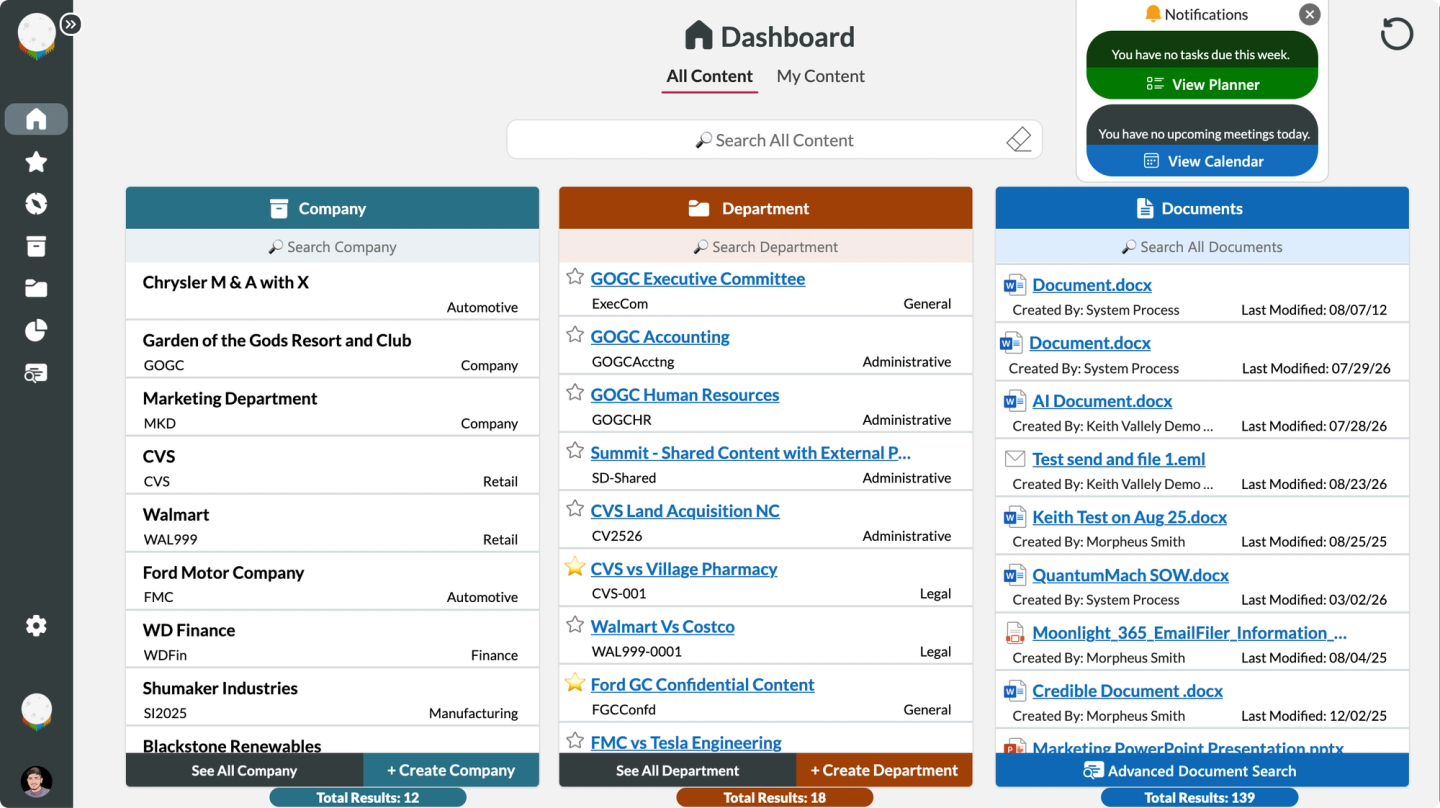
Your Microsoft 365 Digital Dashboard: Secure, Easy-to-Use and Fast. Search, Browse, Open, and Upload/Save all your files to SharePoint, Teams, and More! With additional integrations to Power BI Reports, Planner, Tasks, Calendar's and more!

Access everything you need—documents, emails, matters, clients, projects, departments - all from one powerful, web-based dashboard. The Moonlight 365 Navigator was designed to make your life easier, while keeping everything secure.

To download our product sheet which provides greater details, click here.

The Moonlight 365 SharePoint Content Navigator benefits include:

  • A Uniform Interface for Multiple Departments, Users, and Applications
  • Integrated with: Nearly Every Microsoft 365 Web application Including:

➤ Teams

➤ Outlook

➤ Planner

➤ Calendar

➤ Tasks

➤ Microsoft BI Reporting

➤ And more....

  • Fully Secure. Logged in Users can only access authorized files/locations.
  • Customizable. Every Module, Column, Name, Title, Field can be changed.
  • Multi-Capable: Open, Search, Browse, Upload, Filter your files or sites.

To Learn More about Moonlight 365 Content Navigator on our blog, click here.

SharePoint File Explorer Integration

Saving files should feel natural - not like learning a new system. Moonlight 365 delivers the classic Windows File Explorer experience users know and trust, seamlessly connecting it to SharePoint Online and Microsoft Teams. The result? Familiar folders, simple saves, and effortless access - powered by Microsoft 365, without the constraints of a OneDrive.

Moonlight 365 delivers this experience through a trusted Microsoft 365 integration technology, Zee Drive, which enables secure, drive‑based access to SharePoint Online and Microsoft Teams directly from Windows File Explorer. As an official Zee Drive partner, Moonlight 365 provides:

  • Support
  • Design and Setup of SharePoint or Teams
  • Proper Configuration for File Storage
  • Metadata and More for your files
  • Implementation and Installation of Zee Drive

As a partner of Zee Drive we are authorized to provide setup and support of the solution for your company or firm. To learn more about Zee Drive click this link.

Moonlight File Explorer Integration Options

SharePoint Metadata CleanUp

Moonlight 365 Metadata CleanUp provides Automatic SharePoint Metadata Correction. Stop metadata drift. CleanUp keeps SharePoint tags accurate - automatically. No more worries about the wrong tag being on your files - making search, CoPilot and other metadata dependent solutions more accurate.

When users work in SharePoint and Microsoft Teams, they often open existing documents—Word, Excel, or PowerPoint—modify them, and then save or move those files into a different SharePoint site or document library.

In these scenarios, SharePoint does not automatically overwrite existing metadata values (such as Client, Customer, Matter, Project, or Document Type) if those fields are already populated on the document. Moonlight 365 SharePoint Metadata Cleanup fixes this issue silently in the background using the latest in Power Automation and Power Apps.

To learn more about the SharePoint Metadata Cleanup, click here to download our product sheet.

Many firms and enterprises are now in the midst of a vast undertaking, where all their internal documents, files and emails that have been meticulously protected and organized in Microsoft 365 will soon have an Artificial Intelligence operating on that data. If the metadata on documents is incorrect, is it likely that the AI will 'skip' or 'ignore' mistakenly incorrectly tagged documents and files, which could have adverse effects on AI Outputs. Save yourself the heartache, and invest in the Moonlight 365 SharePoint Metadata Cleanup utility and let it find all the mis-tagged files and documents and correct the issue, silently and in the background.

To Learn More about SharePoint Metadata Cleanup from our blog, click this link.

CleanUp your Metadata on SharePoint

Create SharePoint Sites, Teams and Workflows

The Moonlight 365 Creator provides effortless Creation and Maintenance of SharePoint Sites, Modern Groups, Teams, Document Libraries and Workflows - Metadata, Security, and Design Applied consistently and quickly. Creating Microsoft 365 infrastructure was never so easy as with The Creator.

Content management is more crucial—and complex—than ever before. Organizations must keep pace with rapid change, collaborate effectively, and manage resources with precision. Too often, manual setup and administration hold teams back. That’s why Moonlight 365 Technologies proudly presents Moonlight Creator: a comprehensive solution—built on the trusted Microsoft Power Platform—that automates and streamlines the creation of Site Collections, Modern Groups, Microsoft Teams, and Document Libraries to propel your business forward.

To download our product sheet which provides greater details, click here.

What is Moonlight Creator?

Creator is not just another software product; it’s a robust, scalable solution architected atop the Microsoft Power Platform. Moonlight Creator empowers your business to automate content provisioning with ease—no need for traditional software installations or maintenance. The solution is ready to fit your unique needs, with customization as simple or as advanced as you require.

  • Automated provisioning for SharePoint Site Collections, Modern Groups, Microsoft Teams and Document Libraries.
  • Full integration with Microsoft 365 and Power Platform services.
  • Configures SharePoint provisioned infrastructure with (or without) templates, metadata, permissions and governance.
  • Flexible customization, done by your team our ours
  • Rapidly deployed: Go live quickly, leveraging your Microsoft infrastructure.
  • Compliance & Security: Built-in Power Platform controls and audit trails ensure your organization meets its regulatory governance needs.
  • Cost Savings: Eliminate unnecessary expenditures on software subscriptions by handling customizations in-house or using expert help as needed.

Reimagine your content management processes with Content Creator—a dynamic solution on Microsoft Power Platform, backed by Moonlight 365’s commitment to excellence and your organization’s vision of efficiency, scalability, cost effectiveness, and in tenant security. Moonlight 365 Technologies guides you through every phase—from initial deployment to advanced optimization, including long term support and updates as required.

Take the next step and make your SharePoint platform the Content Management platform your firm or business needs for all your Document and Email Storage requirements by implementing the Moonlight 365 Creator!

Moonlight 365 Creator

Microsoft Word Templates

With the Moonlight 365 WordTemplate, users can create Documents in Seconds - No More Tedious Drafting, No More Confusion! Generate polished Contracts, Agreements, Letters and more while keeping your Word Styles. Moonlight 365 brings Word Templating into an easy to use (for users) solution, which is also easy to update for experienced Word users. Click the video on the left for a short demonstration. Clink the link below to learn more.

Say goodbye to tedious, time-consuming paperwork! Moonlight WordTemplate transforms the way your team creates documents. With just a few clicks in Microsoft Word, you can open a professionally branded Microsoft Word Template, fill out a simple form, and instantly save or share your finished document anywhere you choose. No hassle. No confusion. Just fast, consistent results - every time. To Download a Copy of our Moonlight 365 WordTemplate Information Sheet, click here.

  • Boost Productivity: Generate contracts, presentations, agreements, memos, letters and documents of your choice, in seconds.
  • Streamline: Uniformly create consistent documents, which will ease repetitive document tasks for your entire organization.
  • Seamless Integration: Built on Microsoft Technology, Moonlight WordTemplate works right inside Word (using the Word Ribbon) and stores your templates on a shared drive or secure OneDrive, ensuring accessibility for the folks who should have access.
  • Effortless Updates: All prefixed choices and fields are centrally managed, so keeping your templates and data up to date is easier than ever.
  • Fully Customizable: Use your organizations Word Styles and effortlessly create new templates as your needs evolve, while maintaining your branding.
  • Dynamic Fields: Add text boxes, drop downs, calendar pickers, and even SharePoint Document IDs in footers - giving you complete control and consistency across every document.
  • Reusable Content Snippets: Insert frequently used sections with a single click - perfect for sharing that specific sentence or paragraph in documents.

Moonlight WordTemplate is designed for simplicity and scalability, putting every document your team needs right in the Microsoft Word Ribbon. With quick training, anyone can build or updated templates, empowering your team to stay productive and on-brand.

Ready to revolutionize your workflow? Discover how Moonlight WordTemplate brings professionalism, efficiency, and brand consistency to every document you create.

Microsoft Workflow Solutions

Need to make a repetitive processes efficient? Moonlight 365 has proven solutions for Microsoft 365.

Accounting Request Management Dashboard

For Accounting departments, the requests never stop — and neither do the interruptions. From AP and AR to Treasury and beyond, each team receives multiple types of requests every day. The Moonlight 365 Accounting Request & Workflow Dashboard replaces email chaos with a clear, controlled intake process. Every request is captured, assigned, tracked, and resolved in one place - complete with status visibility and a built‑in audit trail.

Moonlight 365 Accounting Request Management Dashboard turns everyday departmental requests into a clean, trackable workflow - without adding another ticketing platform.

Users submit an Accounting request through an internal Microsoft 365 weblink, receive confirmation that the request is officially logged, and your team manages the work through a dashboard designed for assignment, status updates, review, and closure. Requests can be presorted by internal departmental filters such as AP, AR, Treasury, and more. Each request can also have a specific task set for each department such as (Specific Queries, Task Requests and Uploading of documents such as authorizations). The result is a single, visible process that replaces scattered emails and manual follow-ups with clarity and accountability. To download the Accounting Workflow product sheet, click here.

Every Accounting Department inquiry or request becomes a trackable, assignable, and auditable task.


Requests can be tracked end-to-end, progress can trigger updates to the requester, and completed items remain stored for reporting and post-completion review - creating a reliable audit trail when questions come up later.

How it works

  1. Submit a request through a guided intake experience (a single internal URL where users complete a form).
  2. Requester is notified their request has been formally sent and logged.
  3. Your team manages the work through a web-based view/dashboard for assignment, progress, and completion.
  4. Status updates + closure keep requesters informed, and completed requests are retained for reporting and audit needs

Accounting Request Dashboard

Human Resources Request Center

Human Resources teams are constantly handling requests from every corner of the organization — employee changes, document updates, approvals, reporting, and more. Too often, those requests arrive through email, leaving HR without a clear way to track, assign, or audit the work. The Moonlight 365 Human Resources Request Center provides a structured, centralized system where HR requests are formally submitted, routed to the right person, tracked through completion, and retained with a full audit trail — ensuring accountability, consistency, and peace of mind.

Moonlight 365 Human Resources Request Center turns everyday departmental requests into a clean, trackable workflow - without adding another HR Platform that requires more users logins and higher costs for your business or firm.

Users submit a request through an internal Microsoft 365 weblink, receive confirmation that the request is officially logged, and your team manages the work through a dashboard designed for assignment, status updates, review, and closure. The request form can have multiple types of requests, sorted into specific categories (Employees, Vacation, Sick, Compliance, etc.) and each category having multiple additional queries (Tasks, Requests, Reporting). The result is a single, visible process that replaces scattered emails and manual follow-ups with clarity and accountability. To download the HR Request Center Product Sheet, click here.

Every HR request becomes an auditable, trackable, assignable task.


Requests can be tracked end-to-end, progress can trigger updates to the requester, and completed items remain stored for reporting and post-completion review - creating a reliable audit trail when questions come up later.

How it works

  1. Submit a request through a guided intake experience (a single internal URL where users complete a form).
  2. Requester is notified their request has been formally sent and logged.
  3. Your team manages the work through a web-based view/dashboard for assignment, progress, and completion.
  4. Status updates + closure keep requesters informed, and completed requests are retained for reporting and audit needs
Accounting Task Pane

Legal Request & Workflow Dashboard

Legal teams manage a constant flow of requests - contract reviews, document generation, approvals, and compliance tasks - often arriving through email with little structure or visibility. The Moonlight 365 Legal Request & Workflow Dashboard provides a centralized, structured intake system where legal requests are formally submitted, routed, and tracked through completion. For document‑driven requests, such as Non‑Disclosure Agreements, users simply complete a form and the required information is automatically inserted into the legal document. Every request and document is tracked, assigned, and retained with a full audit trail — giving Legal teams clarity, control, and defensibility.

Moonlight 365 Legal Request & Workflow Dashboard turns everyday legal department requests into a clean, trackable workflow - without adding yet another platform solution that requires more user licenses and setup. Here is how it works:

Users submit a request through an internal Microsoft 365 weblink, receive confirmation that the request is officially logged, and your team manages the work through a dashboard designed for assignment, status updates, review, and closure. Legal Department requests vary from contract reviews to providing specific documents, or advise or consent tasks. No matter the complexity of the legal task, the Legal Request & Workflow solution is up to it. The result is a single, visible process that replaces scattered emails and manual follow-ups with clarity and accountability. This can include document generation.

Every repetitive Legal Department request can be automated, assigned, tracked, and audited.


Requests can be tracked end-to-end, progress can trigger updates to the requester, and completed items remain stored for reporting and post-completion review - creating a reliable audit trail when questions come up later.

How it works

  1. Submit a request through a guided intake experience (a single internal URL where users complete a form).
  2. Requester is notified their request has been formally sent and logged.
  3. Your team manages the work through a web-based view/dashboard for assignment, progress, and completion.
  4. Status updates + closure keep requesters informed, and completed requests are retained for reporting and audit needs
Accounting Task Pane

Microsoft Document & Contract Management Experts

Over 50 Years combined Experience. Hundreds of SharePoint DMS' deployed.

Microsoft SharePoint Document Management Features

Point Solution Document Management system features are near universal. As is their astronomical licensing fees and storage costs. Add to that, the coming deployment of proprietary AI Agents - and your costs are going to rise even faster. SharePoint as a Document Management solution provides all the same features of the legacy systems, but at a fraction of the cost. Besides, you already own Microsoft 365.

Metadata Tagging

Every File when saved to a properly configured SharePoint site will get the following tags, depending on your requirements: Client, Customer, Project, Matter, Document ID, Document Type, Author, Created By, Creation Date, Last Edited Date, Last Edited By, and more.

Folder Trees Per Matter or Project

A properly configured SharePoint Site will have specific folders already created for the specific type of use that the site was created to do. For Lawyers, the type of Matter may determine what folders should be in the site. For Contracts, the contract type, dates, or status may be the folders that provide value.

Security and Collaboration

Microsoft SharePoint security is world class. As a matter of fact, you already use it when you have Microsoft 365. When using Microsoft 365 with files/documents you can share them [internally, externally, or in Teams], or even better, work together on a file at the same time.

SharePoint Scalability

Your Microsoft 365 Tenant provides up to 2 Million SharePoint Site Collections. Each Site Collection can contain up to 2000 document libraries. Each Document Library can contain more than 50,000 items.

Microsoft Copilot - Baked in to SharePoint

AI platforms require lots of processing power. They also require that the data that it uses to provide answers, is well structured. A SharePoint Document Management System (or CMS) can take powerful advantage of Copilot AI if properly configured.

Workflows for Documents

Microsoft 365 provides myriad possibilities for development of specific workflows and tasks that can be part of, or surround a Document or File. Workflows can be triggered when content is saved in a specific folder.

SharePoint Document Management

If your organization already runs on Microsoft 365, you don’t need another point solution, another SaaS subscription, to get a world-class document management system (Legal or Finance). You need SharePoint configured correctly - plus the right experience layer to make adoption effortless. Moonlight 365 delivers that layer: governed workspaces, modern search and browsing, one-click filing, automated metadata correction, and optional mapped-drive convenience — all on the Microsoft platform you already trust.

Microsoft SharePoint Contract Management Features

Contract Management Systems (CMS/CLM's) have several things in common. They are complex, expensive to setup, difficult to maintain, and in most cases provide vastly more capability than your company uses. They are also indispensable to several parts of the organization. Using Microsoft 365 SharePoint as your CMS/CLM will save your company money, reduce complexity, and best of all - will increase user adoption. Having the knowledge of when a Contract is coming up for renewal in easy-to-user dashboard or having notifications sent to the appropriate person based on the contracts themselves is powerful. All of this can easily be part of your businesses solution set if you properly configure Microsoft 365.

Metadata Tagging

Every File when saved to a properly configured SharePoint site will get the following tags, depending on your requirements: Contract Type, Customer/Vendor, Draft or Signed, and more.

Security and Collaboration

Contracts that are confidential, remain so. Contracts that need further collaboration, or to be shared internally or externally can be done so easily and securely.

SharePoint Syntex and Workflows

SharePoint Syntex is machine learning at its best. Provide us with the Contracts, and we will teach the system what types of documents they are, what parts of the document to extract valuable information like: Expiration Date, Renewal Date, Cost or Valuations. Workflows can be built based on these Contract content properties.

SharePoint Contract Management

Point Solutions for Contract Management are incredibly expensive and overly complex for most businesses. Contract management isn’t about storing documents. It’s about knowing what you’ve agreed to - and accessing, building workflows, or reporting on those agreements. Structured Contract forms can be used to teach the system what parts of the documents are important and should be captured. Captured data from the contracts can then be used to setup Workflows such as notifications for expiration's, renewals, valuations, and responsible parties. All of this capability is already available to you in Microsoft 365, with a little help from Moonlight 365. Best of all, there may be no software subscription required.

A Trusted Solutions Provider

Moonlight 365 Professionals have over 50 years of combined experience configuring, developing and deploying solutions on the Microsoft 365 platform. We improve your Microsoft 365 utilization - securely and affordably, providing solutions and workflows, while reducing duplicative software subscriptions and costs.

Contact Us

Have questions about our Microsoft 365 solutions? We're here to help.

Office

7949 North Port Washington Road, Glendale, WI 53217

Business Hours

Monday - Friday: 9AM - 5PM CST

Saturday - Sunday: Closed

Sign up for our Newsletter!

It's our commitment that we only share information you can use.

Sign Up